AI Security
Claude and the Hidden Risk of End-User AI: What Security Teams Need to Know Now
AI tools like Claude are reshaping the attack surface in ways traditional vulnerability management can't track. Here's what security teams need to know.

AI tools like Claude are reshaping the attack surface in ways traditional vulnerability management can't track. Here's what security teams need to know.
AI is steadily becoming the gateway that leads to an ever-expanding attack surface. Prior to the introduction of easy-to-use AI implementations (e.g., Claude, ChatGPT), the vulnerability team’s primary focus was tracking which software was deployed where, patching vulnerabilities when discovered, and hardening deployments in an attempt to proactively secure their environments.
This methodology is primarily dependent on asset management and software tracking combined with version information. And in most environments, the model works like this: If it’s the impacted version, then patch; if it’s not, no current action needed. Over the years, we have learned that even this basic model feels insurmountable at times, even with the best telemetry and a realistic way to calculate risk.
Enter the modern implementation of AI - end-user implementations that combine ease of use with ease of access. Now, instead of vulnerabilities being identified and visible by which version is installed, AI workflow vulnerabilities and risk are completely dependent on the end user and how they interact with a given platform, something that cannot be observed or classified using a CPE or asset inventory.
In this blog post, we will explain the latest feature sets of Claude, one of the most popular suites in this new class of AI from Anthropic. Specifically, we will discuss end-user features in the Windows version of Claude Cowork, how using these features expands your attack surface, and recent examples of Claude and Claude Cowork being shown to be exploitable. Additionally, we will highlight the most recent examples of vulnerabilities + risk in the context of PoCs.
While AI has been around for some time, it has only been in the last few years that end users have had access to such easily accessible interfaces (e.g., chats and prompts). These are tools they likely use in their personal lives and want to bring to the office to make their work lives more efficient. Organizations seem to be taking one of two approaches to this new technology: either fully blocking all things AI and lagging behind as a result, or, the more dangerous option, allowing its use in their environment without truly understanding the risk they’ve accepted.
Claude was originally released to the general public on March 14, 2023, as a “next-generation AI assistant based on Anthropic’s research into training helpful, honest, and harmless AI systems.” (https://www.anthropic.com/news/introducing-claude) Since then, it has made some massive strides; we’ll highlight what we feel are the most notable (that impact attack surface) below:1 2
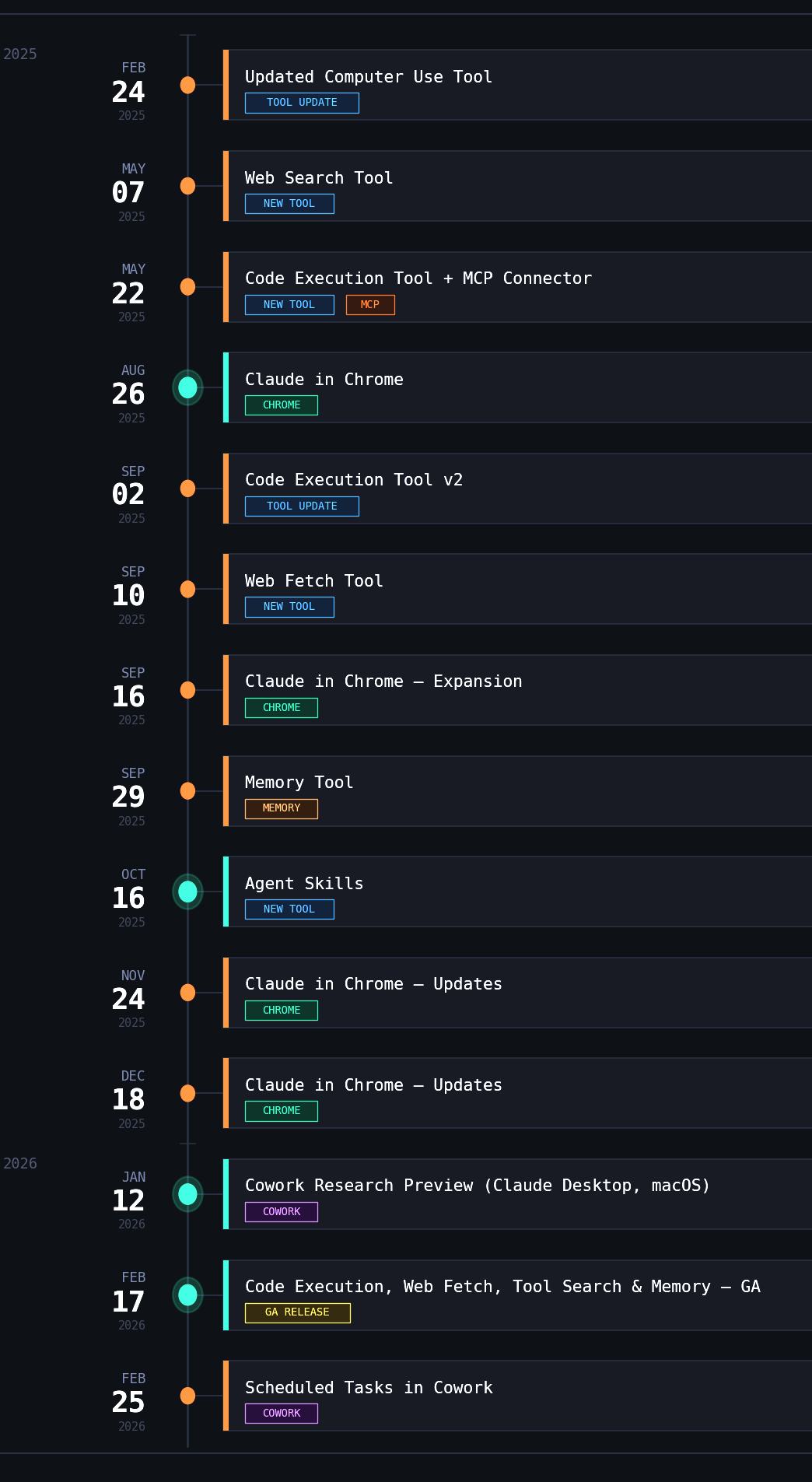
Between February 2025 and February 2026, there have been 14 features that have either been introduced or improved that enable inherent risk. When concerning risk for any organization, that is monumental, especially given that most TPRM teams don’t reevaluate risk on an annual basis. This means that someone who signed off on the risk of Claude in 2025 likely doesn’t know about this expanding attack surface, yet the acceptance still exists.
In order to be informed about the risk you’re accepting, it is beneficial to understand how a given tool operates, how to detect its presence in the environment, and most importantly, what logging is available for responders and engineers. While there are documentation and safe-use guidance pages available from Anthropic 3 4, most of the recommendations are vague and assume the end-user will be able to determine what is good vs. bad in the context of Claude.
At Spektion, we are dedicated to documenting how things operate, so we’ve highlighted key binaries and logging related to Claude Cowork and Claude in Chrome below.
Even though it isn’t discussed very often, Claude has a pretty thorough logging capability. If you are operating in an environment that has the capability to do so, we recommend sending the files found within the following log locations to your central logging platform:
Cowork makes interacting with Claude a lot easier, taking the work out of the CLI and moving it into a new tab in the Desktop application. Outlined below are the available named pipes, executables, and log locations.
Named Pipe(s):
Log Location:
cowork-svc.exe
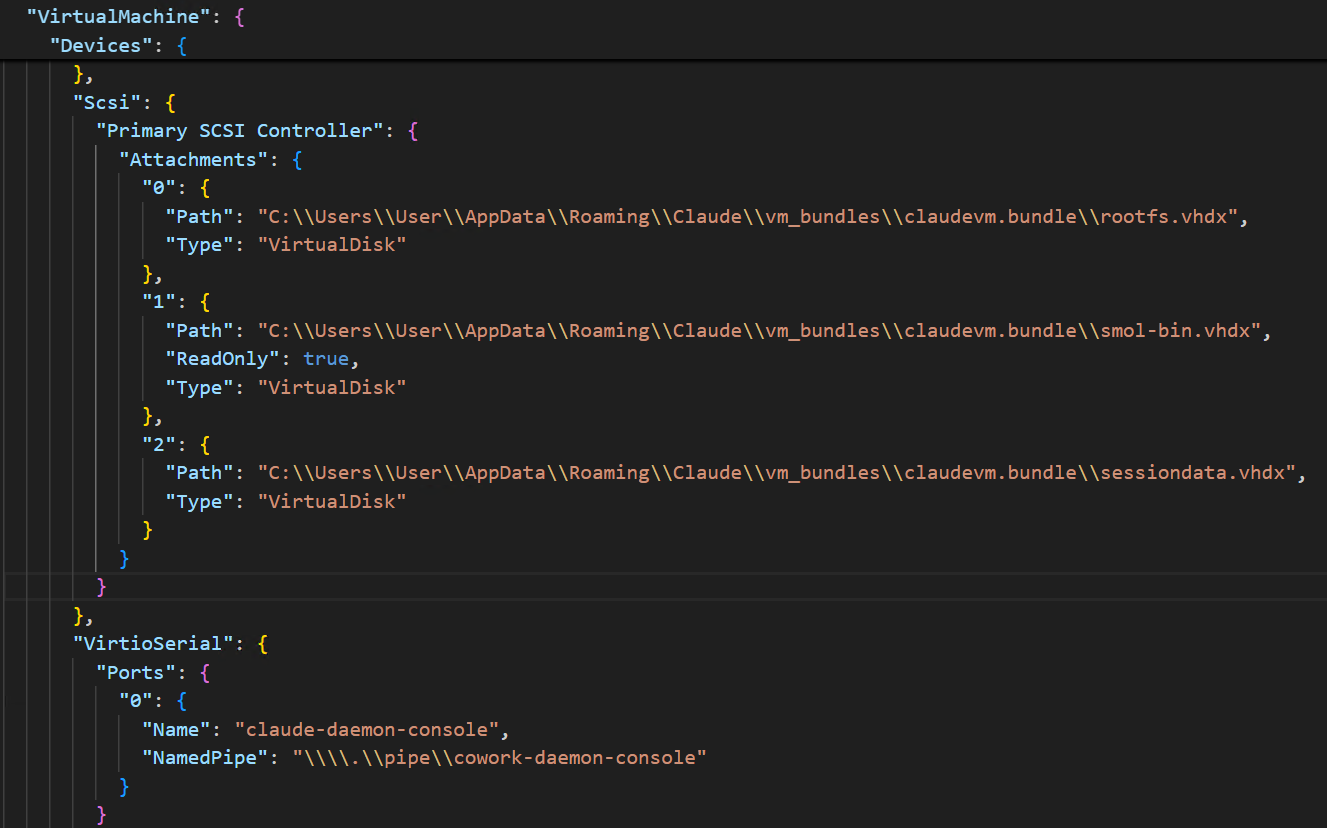
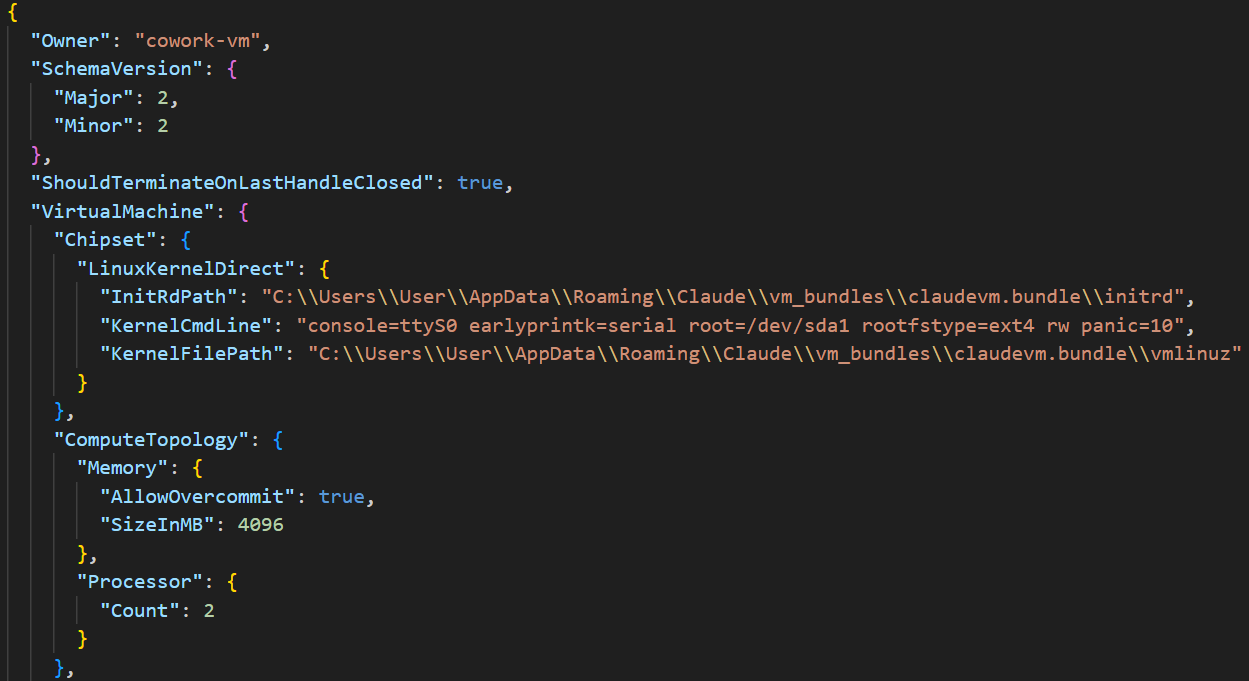
Claude Cowork operates in the context of multiple vhdx (virtual hard drive) files and Linux binaries to achieve its segmentation from the host operating system. These are mounted out of the claudevm.bundle folder path that exists at “C:\Users\User\AppData\Roaming\Claude\vm_bundles\claudevm.bundle\”.
VM bundle
ID (owner): cowork-vm
Claude in Chrome works by interacting with a native messaging host on the device, made possible by chrome-native-host.exe and an extension installed in a supported browser.
Example log:
[2026-03-05 19:10:09 INFO chrome-native-host] Chrome native host starting (version 0.1.0)
[2026-03-05 19:10:09 INFO chrome-native-host] Creating Windows named pipe: \\.\pipe\claude-mcp-browser-bridge-User
[2026-03-05 19:10:09 INFO chrome-native-host] Named pipe created successfully
[2026-03-05 19:10:09 INFO chrome-native-host] Pipe name: \\.\pipe\claude-mcp-browser-bridge-User
[2026-03-05 19:10:09 INFO chrome-native-host] Entering main message loop
[2026-03-05 19:10:09 INFO chrome-native-host] Socket server listening for connections
Example of what the end user sees in their Cowork session:


With full access to the internet, you can start to play out in your mind what an example attack scenario would look like, and what the results would be - we have mapped one scenario out below:
Stage 1: Initial Access
Stage 2: Agent Context Injection
Stage 3: Cross-Domain Escalation
Stage 4: File System Execution (Cowork Layer)
Stage 5: Persistence and lateral movement
Putting this all together, we’ve highlighted recent scenarios of this theoretical attack scenario playing out in Cowork, Claude Desktop, and Claude.
promptarmor.com/resources/claude-cowork-exfiltrates-files
In this attack chain, an unsuspecting end-user uploads files (via Cowork folder usage) that contain a hidden prompt injection within a skill the user downloaded from the internet. Once uploaded, the end user attempts to use the skill to analyze the documents in the Cowork folder. Instead of analyzing the files, the injected prompt exfiltrates a confidential document to a threat actor's Anthropic account using the files API.
How to detect it:
layerxsecurity.com/blog/claude-desktop-extensions-rce
In this PoC, the researcher tricked the Google Calendar MCP into executing code on the local system. This is possible because the MCP server has host-level access, and the calendar invite included instructions to download a batch script from a remote repository and run it. Because the wording of the initial prompt wasn’t specific and vague - “then take care of it for me”, Claude chose the appropriate plugin and next steps on its own.
How to detect it:
In this blog, we explained how Claude and Claude Cowork, while beneficial in the areas of efficiency and technical delivery, are another pathway that leads to an expanded attack surface. A tool that doesn’t follow the traditional paths of version control, risk appetite, or feature hardening. Additionally, we dove a little deeper to identify how the tools work under the hood, behind the scenes of what your end user sees, and what common tools detect. We also highlighted how difficult it is to keep up with the pace of this ever-changing, ever-expanding suite of tools. Finally, we highlighted recent examples of how threat actors benefit from Claude's efficiencies and how researchers are raising the alarm about the vulnerabilities they continually discover in Claude.
1 https://support.claude.com/en/articles/12138966-release-notes
2 https://platform.claude.com/docs/en/release-notes/overview
3 https://support.claude.com/en/articles/13345190-get-started-with-cowork
4https://support.claude.com/en/articles/13364135-use-cowork-safely
Many exploitable vulnerabilities never get a CVE. Book a demo to see how Spektion finds what's actually exploitable across your endpoints.